Wallboard
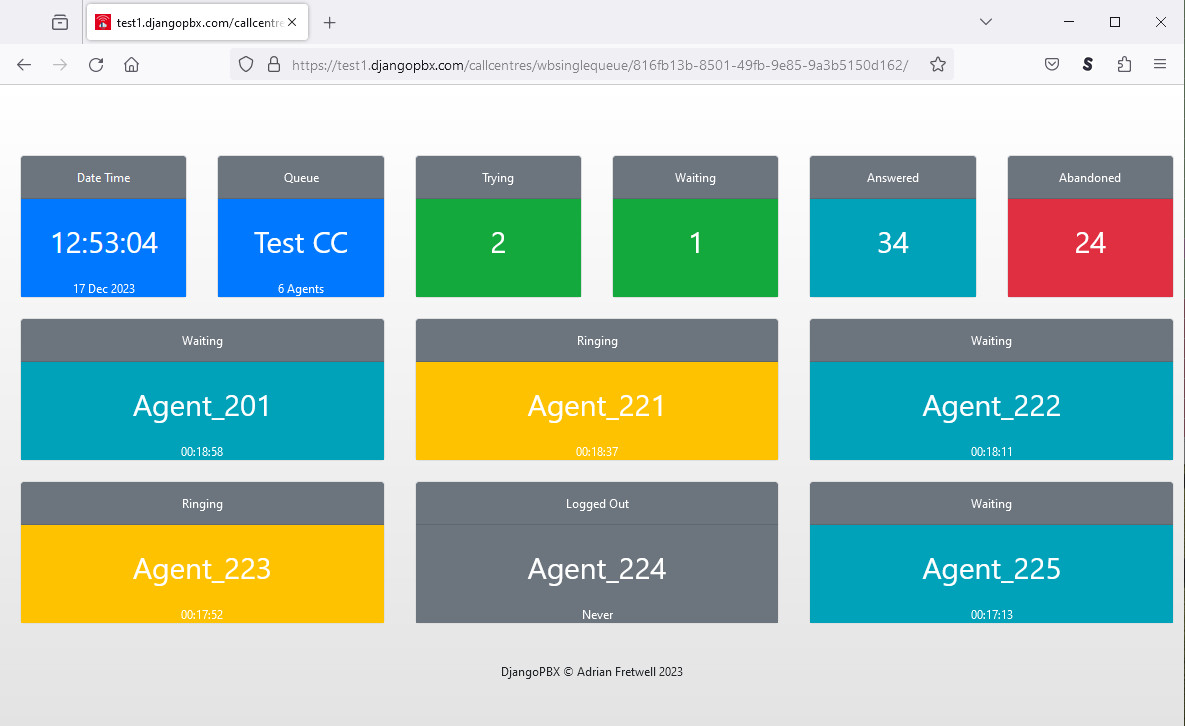
This is a typical Wallboard display.
About the Wallboard
The display consists of a top row of six cards. This row is followed by rows of Agent cards if the Queue is configured to show the Agents in the Wallboard.
The Queue
From left to right, the top row of cards shows a clock with the date, the Queue name with a count of its Agents, then Trying, Waiting, Answered and Abandoned.
Trying is the number of Agents being called.
Waiting is the number of calls waiting to be answered by an Agent.
Answered is a count of how many calls that have been successfully answered by Agents.
Abandoned is a count of the number of calls that have ended without being answered.
Both the Waiting and the Ababndoned cards will change colour dependent on the threshold levels set. By default OK is Green, Warning is Amber, and Critical is Red.
The Agents
The Agent card header displays the Agent’s status, the card body colour also reflects the Agent’s status. The status can be one of:
Logged Out: Grey
On Break: Grey
Waiting: Teal
Ringing: Amber
Answered: Green
The numbers at the very bottom of the Agent card is the number of hours, minutes and seconds since the status last changed. An Agent who is yet to log in for the first time will display “Never” on this line.