Queues
Queues are the fundamental part of a Call Centre, they control how calls are handled, and by whom. The Queue also contains some display settings for Wallboard use.
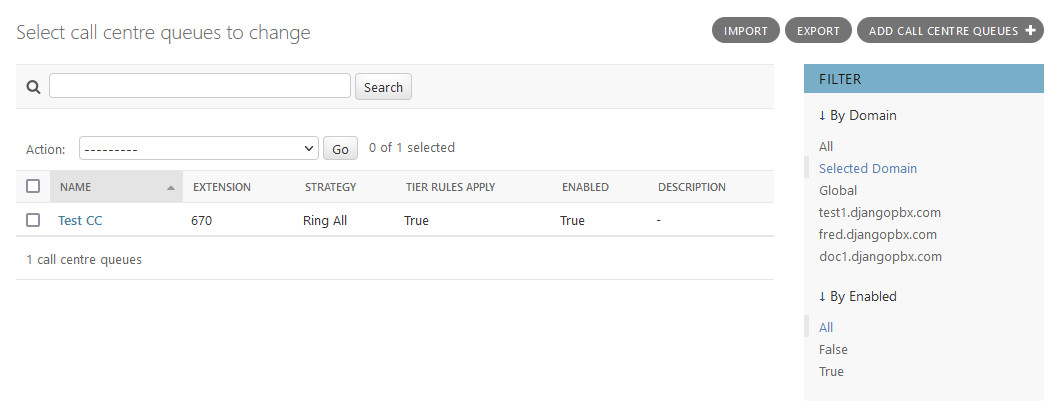
Queues have some additional Admin Actions that can be performed on selected records, the screenshot below shows two.
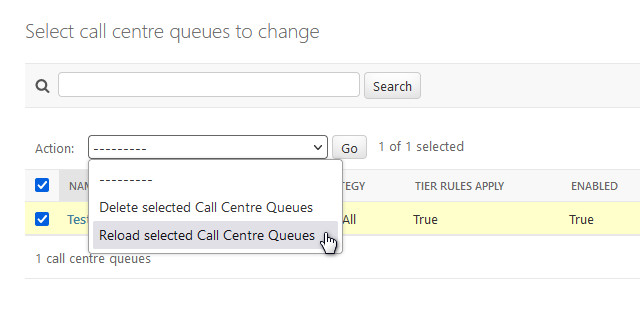
Actions
Delete selected Call Centre Queues
Reload selected Call Centre Queues
The Edit Screen
The Queue edit screen, Change call centre queues, has several sections: the main window and a collapsible section for Wallboard Settings
There is also a Call Centre Tiers section that allows Agents to be assigned to the Queue with Tier levels and positions.
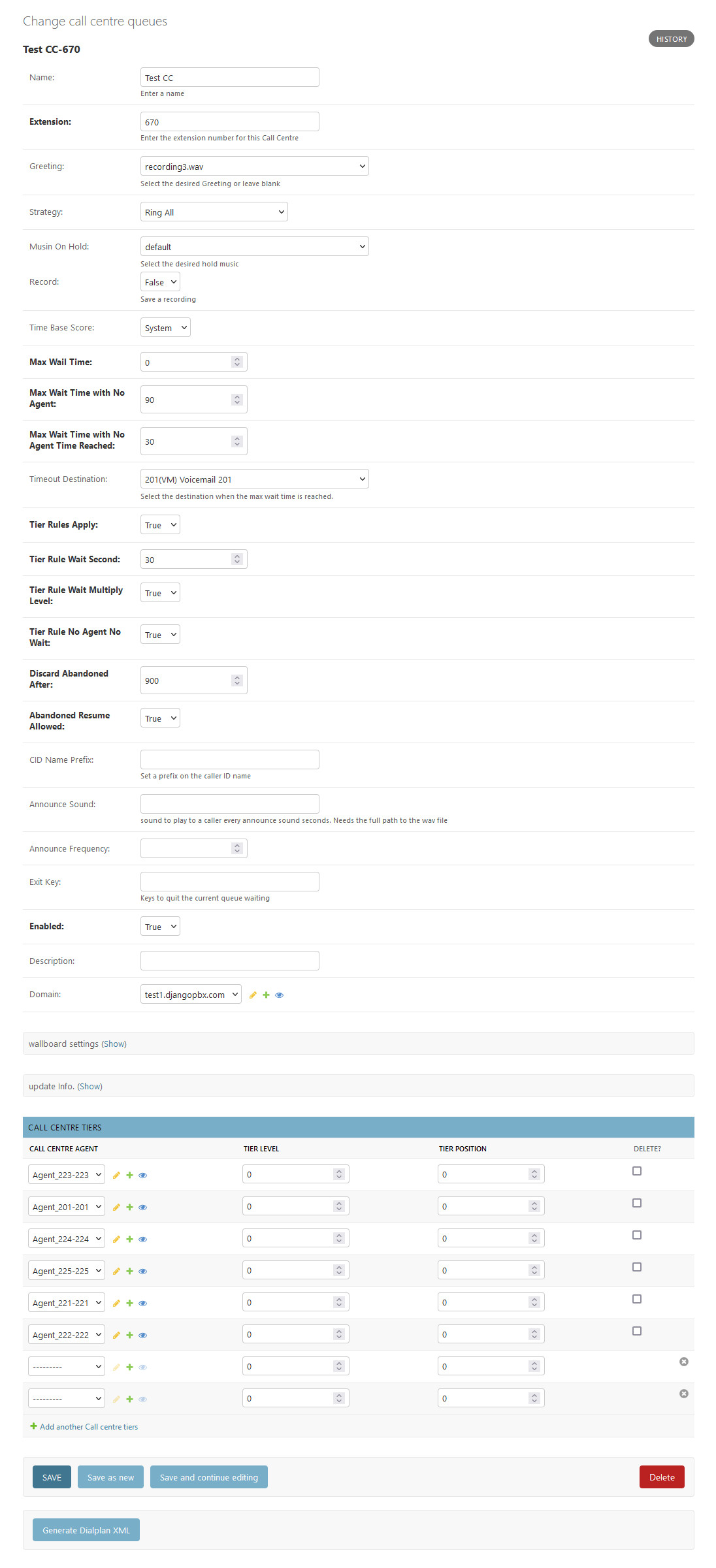
Queue Options
- Name
The Queue name.
- Extension
The number to call to join the Queue.
- Greeting
A recording to play when joining the Queue, it can be left blank.
- Strategy
The strategy defines how calls are distributed in a Queue. A table of different strategies can be found below.
Ring All: Rings all Agents simultaneously.
Longest Idle Agent: Rings the Agent who has been idle the longest, taking into account the Tier level.
Round Robin: Rings the Agent in position but remember last tried Agent.
Top Down: Rings the Agent in order position starting from 1 for every member.
Agent with Least Talk Time: Rings the Agent who has spent the least time in a call.
Agent with Fewest Calls: Rings the Agent who has handled the fewest calls.
Sequentially by Agent Order: Rings Agents sequentially by Tier and order.
Random: Rings Agents in random order.
Ring Progressively: Rings Agents in the same way as top-down, but keeping the previous Agents ringing (it will end up as ring-all).
- Music On Hold
The system will playback whatever you specify to incoming callers.
- Record
If set to True the Queue will be recorded.
- Time Base Score
This can be either queue or system. If set to system, it will add the number of seconds since the call was originally answered (or entered the system) to the caller’s base score. Raising the caller’s score allows them to receive priority over other calls that might have been in the Queue longer but not in the system as long. If set to queue, you get the default behavior, ie nobody’s score gets increased upon entering the Queue (regardless of the total length of their call).
- Max Wait Time
Defaults to 0 to be disabled. Any value is in seconds, and will define the delay before we quit the callcentre application if the member hasn’t been answered by an Agent. Can be used for sending call to voicemail if wait time is too long.
- Max Wait Time With No Agent
Defaults to 90 to be disabled. The value is in seconds, and it will define the amount of time the Queue has to be empty (without logged Agents, on a call or not) before we disconnect all members. This principle protects kicking all members waiting if all Agents are Logged Out by accident.
- Max Wait Time With No Agent Time Reached
Defaults to 30. This will define the length of time in seconds after the Max Wait Time With No Agent is reached to reject a new caller.
- Timeout Destination
Where to send the call if it is kicked out of the call centre.
- Tier Rules Apply
This defines if we should apply the following Tier rules when a caller advances through a Queue’s tiers. If set to False, they will use all Tiers with no wait.
- Tier Rule Wait Second
The time in seconds that a caller is required to wait before advancing to the next Tier. This will be multiplied by the Tier level if Tier Rule Wait Multiply Level is set to True. If Tier Rule Wait Multiply Level is set to false, then after Tier Rule Wait Second’s have passed, all Tiers are open for calls in the Tier Order and no advancement (in terms of waiting) to another Tier is made.
- Tier Rule Wait Multiply Level
If set to False, then once Tier Rule Wait Second is passed, the caller is offered to all Tiers in order (level/position). If set to True, the Tier Rule Wait Second will be multiplied by the Tier level and the caller will have to wait on every Tier’s Tier Rule Wait Second before advancing to the next Tier.
- Tier Rule No Agent No Wait
If set to True, callers will skip Tiers that don’t have Agents available. Otherwise, they are required to wait before advancing. Agents must be Logged Out to be considered not available.
- Discard Abandoned After
The number of seconds before we completely remove an abandoned member from the queue. When used in conjunction with Abandoned Resume Allowed, callers can come back into a queue and resume their previous position.
- Abandoned Resume Allowed
If set to True, a caller who has abandoned the queue can re-enter and resume their previous position in that queue. In order to maintain their position in the queue, they must not abandoned it for longer than the number of seconds defined in Discard Abandoned After.
- CID Name Prefix
Set a prefix on the caller ID name.
- Announce Sound
A sound to play to a caller every Announce Frequency (in seconds). Needs the full path to the .wav file.
- Announce Frequency
How often the Announce Sound is played in seconds.
- Exit Key
Keys to quit the current Queue waiting.
- Description
Enter a description as a note or to define what the Queue is for.
- Wallboard Settings
A collapsed section, these settings control how the Queue will display on the Wallboard.
Name: The name of the Queue, this is displayed next to the clock on the Wallboard.
Description: This is for any notes about the Queue and is not displayed on the Wallboard.
Waiting Warning Level: The number of calls waiting before the waiting card turns from green to amber.
Waiting Critical Level: The number of calls waiting before the waiting card turns from amber to red.
Abandoned Warning Level: The number of calls lost before the abandoned card turns from green to amber.
Abandoned Critical Level: The number of calls lost before the abandoned card turns from amber to red.
Show Agents: Set to True to show the Agents on the Wallboard
Number of Agents per row: How many Agents to show per row.
All the Wallboard colours are controllable via the pbx.css stylesheet.
- Call Centre Tiers
This section allows Agents to be assigned to the Queue with Tier levels and positions.